
 Maconomy
Upgrading to the latest Maconomy Version
Considering to upgrade to the latest version of Maconomy can maybe be a big consideration as you believe the process will be time consuming and interrupt business.
We have created a process that guides you safely through the steps for upgrading and makes it smooth and gets you the maximum value of the latest version.
Selected benefits of moving to the latest version
Understand how we make you more efficient with one integrated solution
Fully web-based access
Move to a modern browser-based Maconomy experience with less local deployment work and easier access for users wherever they work.
Better user experience
Give users a cleaner interface and improved daily workflows, making adoption easier and reducing friction in core tasks.
More efficient processes
Use the upgrade to revisit older ways of working and align your processes with newer Maconomy capabilities and best practice.
Less extension maintenance
Review legacy customizations and replace what can now be handled by standard functionality or simpler process design.
Stronger decision support
Take advantage of Power BI dashboards and reporting options that improve insight into projects, people, finance, and performance.
Ready for Power Launch
Use the latest version as a stronger foundation for Power Launch, add-ons, and future improvements across your Maconomy setup.
We have helped many Maconomy clients
Here are some of the Maconomy clients we have serviced.






















The steps to fully upgraded
The model below reflects our 5 phases and steps in our implementation approach that takes you safely from A to B and moving you from your current version of Maconomy to the latest.
For your upgrade we might skip some of the steps depending on your specific situation and usage of Maconomy - but overall consider this to be your baseline plan.
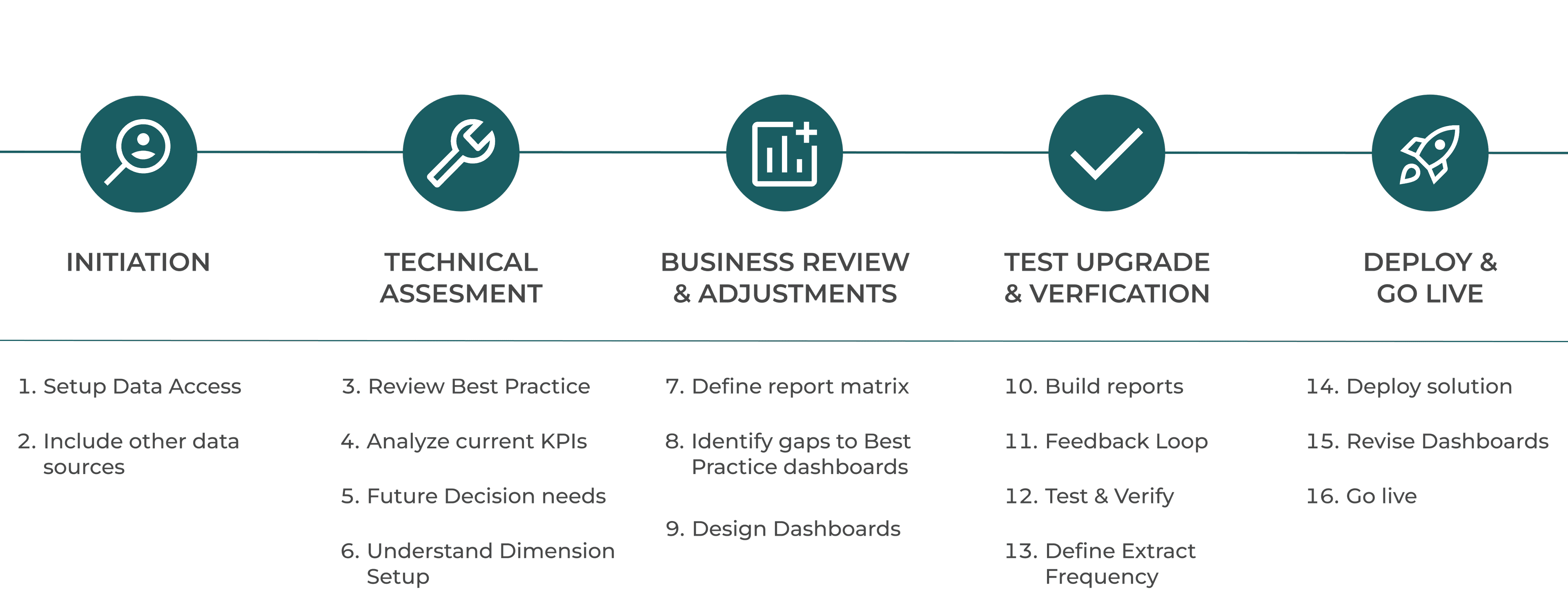
Click on each step and see the underlying process description of what happens.
Step 1 - Setup Data Access
We establish secure access to required environments and data so the upgrade process can start on a controlled baseline.
Step 2 - Include other data sources
We identify and include additional data sources that are required for reporting, validation, and downstream decision support.
Get a meeting - and ask for a proposal.
When you consider to upgrade to the latest version you might have various questions - let's have a call to talk about options and take you through the best approach and baseline in terms of:
- Demo of the newest features in latest versions
- Discuss and walk through of upgrade process
- Timeline and commercials